

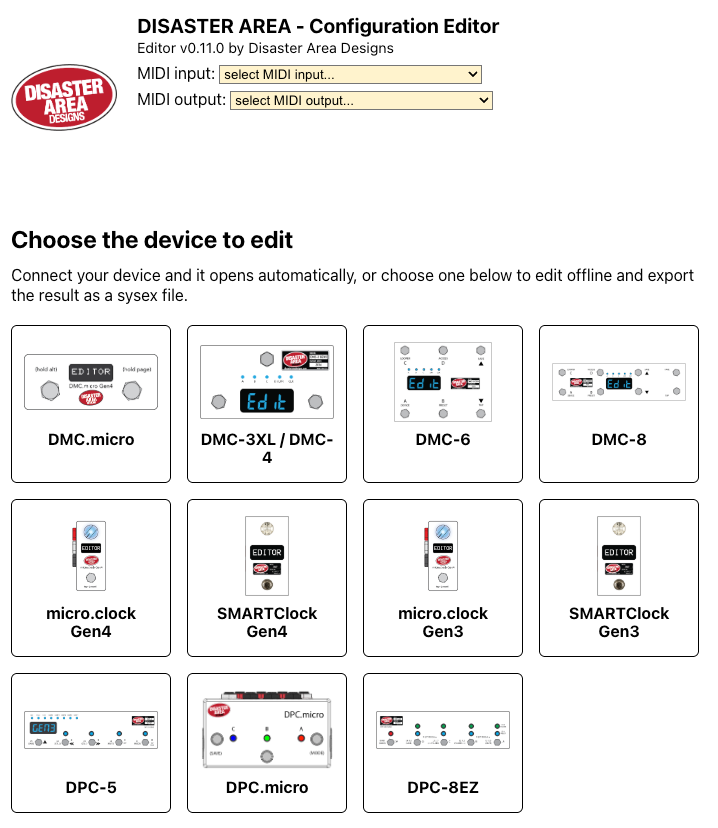
One editor for every Disaster Area MIDI controller
The Disaster Area Editor now edits all of our MIDI controllers (except the MIDI Baby, sorry!) from a single page: the DMC.micro, DMC-3XL and DMC-4, DMC-6, DMC-8, DPC-5, DPC.micro, DPC-8EZ, micro.clock and SMARTClock. It runs in your browser at disasterarea.io/editor-beta, with nothing to install.
It is a beta. If something doesn't work, or you'd like it to do something it doesn't, please tell us on the contact page.
Gen1 and Gen2 controllers are not supported by the editor, and will not be added to it.
Why we made one editor
Until now every product had its own editor, a separate copy of the same program. A fix or a new feature had to be made in each copy by hand, and the copies slowly drifted apart. With one editor a fix is made once and every pedal gets it, the editor looks and works the same whichever pedal you own, and a new pedal only needs its own settings added.
To share one editor, every pedal has to identify itself and exchange its settings and presets in the same way. That needed new firmware, which is what is on this page.
What you need to do
- Update your pedal's firmware. Find your pedal in the table below and download its file. The Support page has the update instructions. The editor works with the oldest version listed for your pedal, and we recommend the version in this release, which fixes problems in the earlier ones.
- Use a browser that supports Web MIDI, such as Chrome or Edge on a computer, or Chrome on Android. Safari on iPhone and iPad doesn't support Web MIDI: use a Web MIDI browser app such as Web MIDI Browser.
- Connect your pedal to your computer with USB. Some pedals need their USB mode set to MIDI while you use the editor. The Help tab in the editor has the steps for your pedal.
- Open the editor. It finds your pedal, reads its settings and presets, and opens the right editor for it. Give it a few seconds.
You can also use the editor without a pedal connected. Pick your pedal on the start page, edit, and export your settings to a file. Import the file later to send it to your pedal.
Firmware downloads
Gen4 pedals use a .uf2 file and Gen3 pedals use a .bin file. The Support page explains how to load them.
| Pedal | Firmware | Download | Oldest version the editor accepts |
|---|---|---|---|
| DMC.micro and DMC.micro PRO Gen3 | 2.31 | Download .bin | 2.10b |
| DMC.micro Gen4 | 2.31 | Download .uf2 | 2.20a |
| DMC-3XL and DMC-4 | 2.00 | Download .bin | 2.00 |
| DMC-6 | 2.00 | Download .bin | 2.00 |
| DMC-8 | 2.00 | Download .bin | 2.00 |
| DPC-5 Gen3 | 1.06 | Download .bin | 1.05h |
| DPC.micro Classic | 1.05a | Download .bin | 1.04 |
| DPC.micro NS Classic | 1.05a | Download .bin | 1.04 |
| DPC.micro Gen4 | 1.05a | Download .uf2 | 1.04 |
| DPC.micro NS Gen4 | 1.05a | Download .uf2 | 1.04 |
| DPC-8EZ Gen3 | 1.03e | Download .bin | 1.03b |
| micro.clock Gen4 | 2.03a | Download .uf2 | 2.01 |
| SMARTClock Gen4 | 2.03a | Download .uf2 | 2.01 |
| micro.clock Gen3 | 1.06c | Download .bin | 1.06a |
| SMARTClock Gen3 | 1.50b | Download .bin | 1.50b |
The micro.clock Gen4 and SMARTClock Gen4 use the same firmware file. NS means "no switch". If your DPC.micro is an NS, use an NS file. Both DMC.micro Gen3 models, the standard and the PRO, use the same file.
What's new in each firmware
DMC-6 and DMC-8 2.00
Firmware 2.00 lets the DMC-6 and DMC-8 be edited from the Disaster Area Editor. Each pedal has its own file and its own page in the editor.
The pedal resets itself the first time it starts on 2.00. Settings, presets and preset names all go back to their factory values, and there is no way to carry them over. Write down anything you want to keep before you update.
Editor support
- Settings and presets are read and written by the editor over USB. The pedal must have USB set to MIDI, which is now the factory setting.
- The whole pedal can be dumped and restored over sysex: settings, presets, preset names, bank names and the two favorites.
- Preset 0 is the bypass preset. There are at most 25 banks (100 presets), then FAV2 and FAV.
- Each preset starts on its own program number, with the clock on.
Custom devices
- CUSTOM 1 and CUSTOM 2 are new devices, as on the DMC.micro and DPC-5. Set their lowest and highest preset, bypass CC, tap tempo CC, expression CC and display style in the setup menu (C1LO to C2DS) or in the editor.
- The device list now matches the DMC-3XL's and the DMC.micro's, so device numbers are the same across pedals.
- Added the Darkglass Anagram. The ToneX ONE entry is shown as TONEX N-A, because it isn't supported on Gen3 pedals.
Bypass and MIDI
- Bypass handling is rewritten, so a preset and a footswitch bypass a device the same way.
- MIDI in and out are rewritten. Message lengths come from the status byte, the outputs send the same messages, and the MIDI clock is held off while another message is being sent.
- Messages the pedal receives are checked before they are used, and settings sent from the editor are checked against each setting's range.
- Fixes: preset names could overrun their buffer, MIDI channel 16 read past the end of the device table, and stepping back through the modes went one past the end of the mode list.
Removed
- The CC mode. ACCESS mode stays.
DMC-8
- The DMC-8's tap footswitch is always bank down in preset mode. The T FS setting only applies to the DMC-6.
After the update the pedal starts with a factory reset and the display counts down while it works. Let it finish.
DMC-3XL and DMC-4 2.00
Firmware 2.00 lets the DMC-3XL and DMC-4 be edited from the Disaster Area Editor. The DMC-3XL and DMC-4 share one file.
The pedal resets itself the first time it starts on 2.00. Settings, presets and preset names all go back to their factory values, and there is no way to carry them over. Write down anything you want to keep, or save it from the old editor before you update.
The new editor needs 2.00 on the pedal. The old DMC-3XL editor does not work with 2.00.
Editor support
- Settings and presets are read and written by the editor over USB. The pedal must have USB set to MIDI, which is now the factory setting.
- Preset 0 is the bypass preset. The editor lists presets 1 to the MAX PRESET you set, then FAV2 and FAV.
- The highest MAX PRESET is now 125. The favorites are stored separately, FAV as the last preset and FAV2 (the second favorite, loaded from the MultiJack in FAV2 mode) before it.
- Each preset starts on its own program number, with the clock on.
- Util mode is explained in the editor: L is a tap of the left footswitch and A is a hold, R is a tap of the right footswitch and B is a hold.
Custom devices
- CUSTOM 1 and CUSTOM 2 are new devices, as on the DMC.micro and DPC-5. Set their lowest and highest preset, bypass CC, tap tempo CC, expression CC and display style in the setup menu (C1LO to C2DS) or in the editor.
- The device list now matches the DMC.micro's, so device numbers are the same across pedals. Every device on the old list is still there, with three names corrected: SPECULAR, MIDI NOTES and STRYMON v2.
- Added the Darkglass Anagram.
- The ToneX ONE entry is shown as TONEX N-A. The ToneX ONE isn't supported on Gen3 pedals, because it talks over USB-CDC rather than USB MIDI.
Removed
- Set lists, including the SETL menu item and the set list mode.
MIDI
- MIDI output is handled by the same code as the DMC.micro's, so the USB host, DIN and MultiJack outputs send the same messages. Program changes are no longer sent twice, and notes sent to a USB host device carry their velocity.
- The bypass handling is the DMC.micro's.
- Messages the pedal receives over USB and DIN are checked before they are used. Sysex that isn't for the pedal is passed on.
- Settings sent from the editor are checked against each setting's range, and are refused if the serial number doesn't match the pedal.
After the update the pedal starts with a factory reset and the display counts down while it works. Let it finish.
DMC.micro 2.31
DMC.micro, DMC.micro PRO and DMC.micro Gen4
- The DMC.micro PRO identifies itself as a PRO again. Firmware 2.3 reported every Gen3 unit as a standard DMC.micro, so the editor showed the wrong model.
- Gen4: reading settings and presets into the editor over USB is more reliable.
micro.clock Gen4 and SMARTClock Gen4 2.03a
- Fixes an issue where reading the configuration into the editor over USB could lose part of the data, so some settings showed the wrong values.
- Settings that were never saved, on a pedal updated from older firmware, no longer switch features such as GLOBAL TAP on by themselves. They return to their factory values at power-up.
SMARTClock Gen3 1.50b
- CV minimum and maximum times of 640 ms and longer now read and write correctly through the editor.
- Division D is now included when presets are read into the editor.
The new editor needs 1.50b on the SMARTClock Gen3.
DPC.micro 1.05a
DPC.micro and DPC.micro NS, Classic and Gen4
- The MIDI output channel and the startup mode no longer swap places when the pedal is restarted.
- Gen4: reading settings and presets into the editor over USB is more reliable.
- Settings files saved from the editor now identify the DPC.micro, so they can't be loaded into a micro.clock by mistake.
DPC-5 Gen3 1.06
- While the editor reads all of its presets, the display shows DUMP. The serial number is no longer shown at start-up.
- Fixes a memory error when preset names are loaded.
DPC-8EZ Gen3 1.03e
- Presets sent from the editor are stored in full. Previously part of each preset could be filled with stray data.
- Sending presets from the editor no longer steps the pedal through each one as it arrives. The pedal only reloads when the preset in use changes.
micro.clock Gen3 1.06c
The version number is unchanged; this is a new build of 1.06c.
- A MIDI Program Change is no longer also handled as a Control Change.
- The output voltage screen no longer reads past the end of its settings, and turning the knob on the program screen can no longer overwrite other settings.
Need help?
Firmware update instructions and tools are on the Support page. For questions or feedback about the editor, use the contact page.