

Welcome to the MIDI BABY BETA Program.
Updated 01.20.2026
This page contains the information and files needed to update your MIDI Baby or MIDI Baby 3 firmware, as well as resources to help you get the most out of its new features and enhancements.
If you find any issues with the beta version, or would like to request changes or enhancements to the beta firmware, please use the contact form below to submit those requests. Please note that we may not respond to every beta request, but if we do make changes to the firmware we will post the new files here on this page so check back often.
WHAT’S NEW?
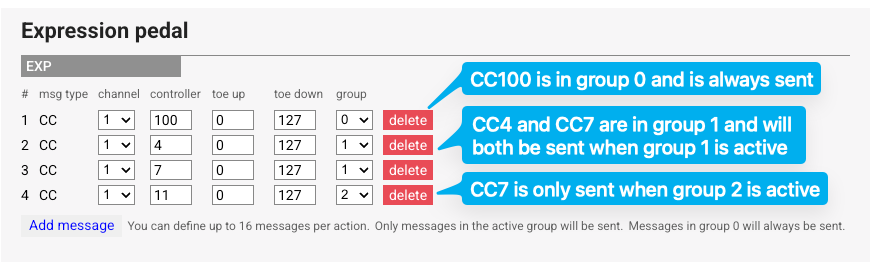
v19 / v35 adds Expression Groups, a new way to manage the expression inputs for MIDI Baby and Baby 3. When you add expression pedal actions, you can now select the Group number alongside the MIDI controller and channel values. Only items in the active Group will be sent when the expression pedal is updated.
This example will send CC100 in group 0, which means it will always be sent if the expression pedal is moved.
CC4 and CC7 are in group 1, and will be sent when group 1 is active, while CC11 is in group 2 and will only be sent when group 2 is active.
Moving the expression pedal while group 1 is active will send CC100 (group 0,) CC4, and CC7.
Moving the pedal while group 2 is active will send CC100 (group 0) and CC11.
Expression Group Tips and Tricks:
You can disable all expression pedal actions by selecting a “blank” group with no assigned members
Expression group settings may be combined with program selections, so that some of your presets can have different expression pedal functions
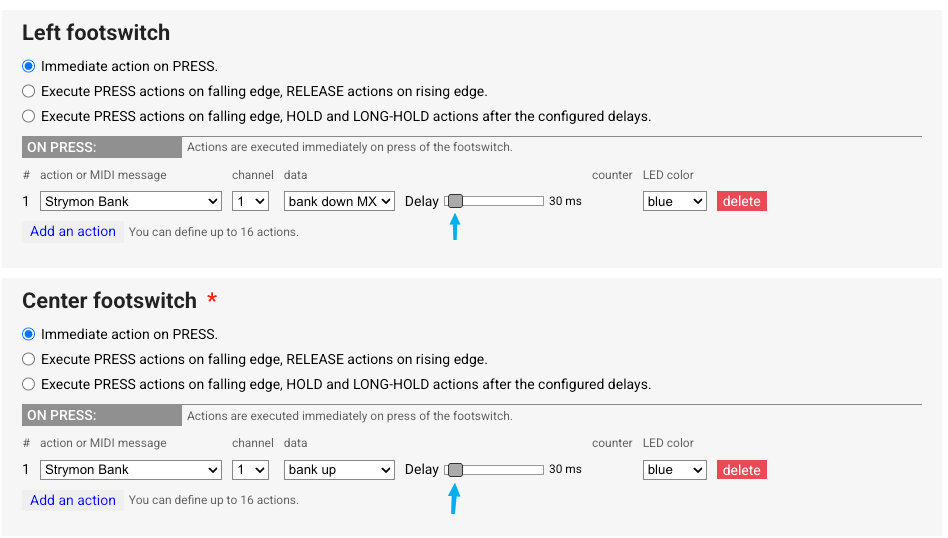
We’ve also added some additional parameters to the Strymon Bank command. The new BigSky MX pedal has a slightly different command structure and will not work with our existing setup, so we’ve added the Bank Down MX action and a new Delay slider to the editor.
Here’s a sample setup for the BigSky MX bank up / down. Use Bank Down MX for bank down, with a 30ms delay. Use Bank Up for bank up, again with a 30ms delay.
The other large Strymon pedals will work with the previous Bank Down command and the default 10ms delay.
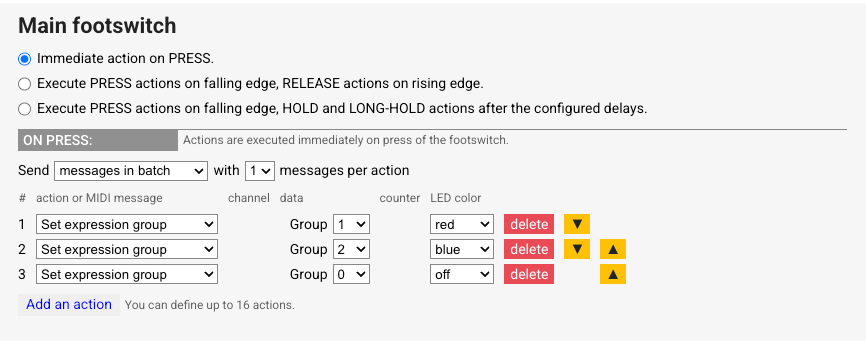
Use the new Set Expression Group action to set the active group. MIDI Baby 3 devices have separate Groups for each expression pedal input.
In this example, tapping the footswitch changes the group from 1 (CC100, CC4, CC7) to 2 (CC100, CC11) to 0 (CC100 only.)
MIDI BABY BETA
Access to the BETA features requires updating your device firmware with v19 / v35, found below.
After you update, use the BETA version of the MIDI Baby editor located here:
Gen4 Firmware - two USB ports
Update Procedure:
Power down your MIDI Baby.
Hold the center button of your MIDI Baby and plug in the USB cable.
Drag the firmware .UF2 file into the RPI-RP2 removable USB drive.
Baby will reboot when update completes.If you accidentally upload the wrong firmware, remove the bottom plate of your device and press the BOOTSEL button while inserting the USB cable to force update mode.
Gen3 Firmware - one USB port
Update Procedure - Mac Update Procedure - Windows
BETA Change Log:
v19 / v35 BETA 2 (released 01.21.2026)
Changes LED blinking during editor writes - speeds up writing / updating from editor
[EDITOR] change slider behavior, now only sends update message on slider release
v19 / v25 (released 01.20.2026)
Adds Expression Groups
Adds Bank Down MX option to Strymon Bank command
Adds delay control slider to Strymon Bank command